

 myCSUSM







Sharing Media from Google Drive
What it is
Google Drive allows you to not only upload files for easy access from wherever you're signed into your Google account, and you can also upload and share photos, documents, and videos in a few simple steps. Once you upload files to Google Drive you can also share them with others so that they can view, edit, or download them at anytime. It only takes a few moments to share a video file on Google Drive, and as long as the correct permissions are in place, the recipient can easily access the file.
Getting the Video Into GDrive
https://support.google.com/drive/answer/2424368?co=GENIE.Platform%3DiOS&hl=en
Sharing the Video
- Open Google Drive and ensure you're logged into your Google account.
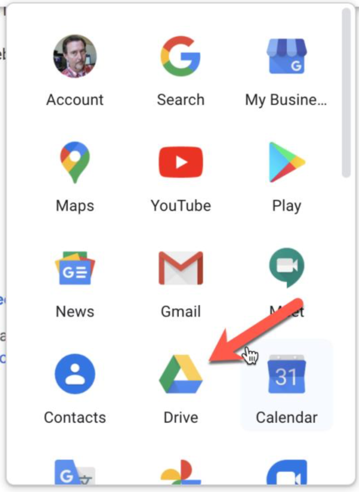
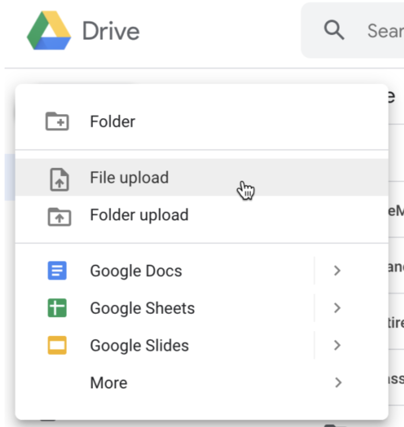
- Click the "+New" button on the left hand side and choose File upload to upload your video from your computer. If your video file is already uploaded to
Google Drive, locate it in your Drive's file list.
- Click on the video file once to highlight it.
- Right-click on the file name to open a menu of options.
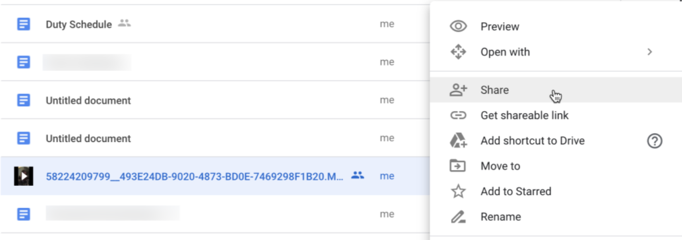
- Click Share.
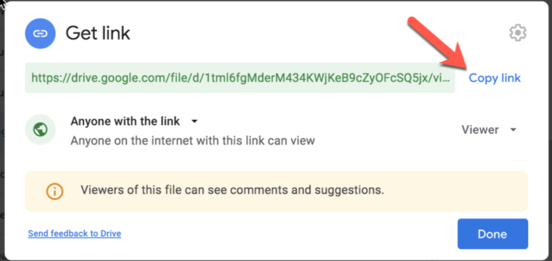
- To share via a link, copy the link at the top of the window. To change the permission
settings for the link click the tab above the link and select your preferred setting, and then copy the link once its updated. Anyone with the link is a good basic setting.
-
Click Done and paste the link where it needs to go – probably in Cougar Courses.