

 myCSUSM






Enrollment Resources
- Academic Requirements Report (ARR)
The Academic Requirement Report (ARR) is the official graduation evaluation report utilized by the university and students to track completion of their degree requirements. For more information, visit the Academic Requirement Report page.
- Using Your Degree Planner and Schedule Assistant to Enroll
The enrollment video is based on the Full Site view in the Student Center. If you are on a mobile device using the modernized view, you will need to select the Full Site view: Visiting the Student Center in Full Site View (PDF)
How to Enroll in Classes:
Video Shortcuts
- Start at 00:16 for Finding Your Enrollment Tools (PDF)
- Start at 1:40 for Using Your Degree Planner (PDF)
- Start at 6:15 for Using Your Schedule Assistant (PDF)
- Start at 9:20 for How to Enroll in Classes using Class Search Method (PDF)
- Start at 11:03 for Loading Your Shopping Cart and Finishing Enrollment (PDF)
- Suggestions for Building a Full Time Schedule
- Common Error Messages When Enrolling
Sample Error Messages:
- "Need a Permission Number": Some classes require that you get permission from the instructor to enroll in that class. Instructions on how to get a permission number
- "Prerequisite Needed": Some classes require a prerequisite course to be completed before you can enroll. If you have not taken the prerequisite, you will need to take that first. If you receive this error message and believe that you have taken the prerequisite course, request a prerequisite waiver to Please note that approval to override prerequisites does not guarantee enrollment into a course.
- "Has Reserve Caps": Some classes have seats reserved for students in specific majors. If you are not in that major, you may not be able to enroll. You can look at the class description to see if there is a date when the reserved seats are lifted for all students. More information about reserve caps.
- "Term Maximum Exceeded": Students are allowed to enroll in 16 units during the enrollment period. For unit increase date click on term in Enrollment Information.
- Waitlisting Classes
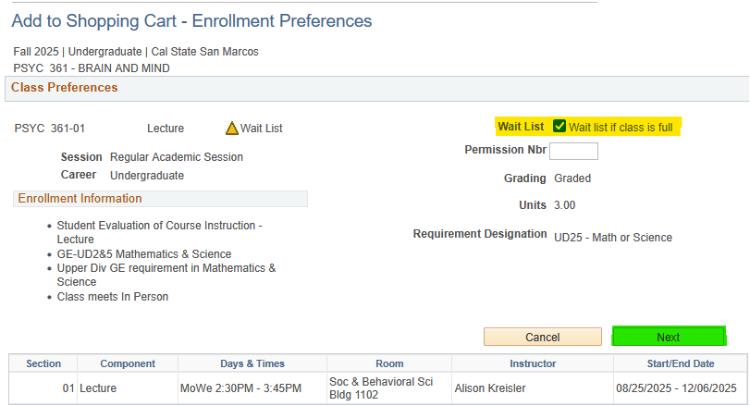
- During the enrollment process or in the Shopping Cart, click on the class to view course details.
- Under Class Preferences, check the Waitlist if Class is Full box then Click Next.
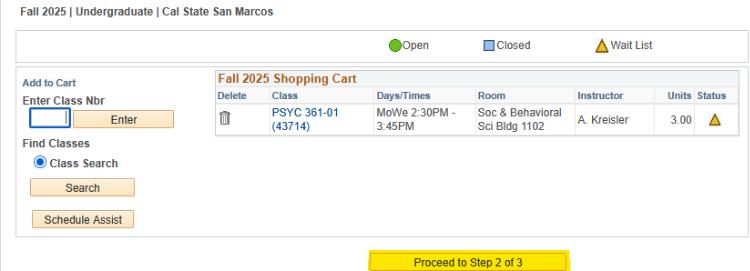
- Click Proceed to Step 2 of 3.
- Click Finish Enrolling.
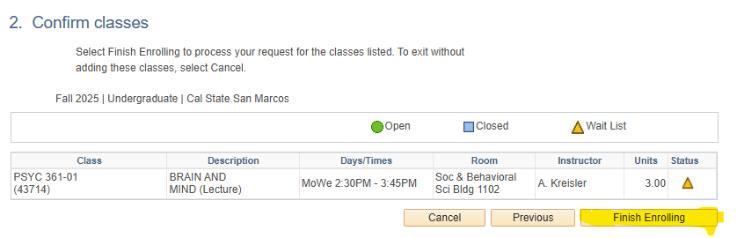
Your waitlist position number is displayed in the message. Check My Class Schedule to monitor waitlist position and enrollment status. More information: See Waitlist FAQ
- Unit Limits By Term and Unit Overload Contract
Unit Limits By Term
Term Standard Limit Increased Limit Academic Notice Special Cases & Notes Fall/Spring 16 units 19 units
For unit increase date click on term in Enrollment InformationMax 14 units; not eligible for unit increases. Graduating seniors (applied for graduation, in final semester) and Veterans may enroll in up to 19 units immediately. Requests for more than 19 units are reviewed through the Unit Overload process. Summer 13 units Contact your Academic Advisor (exceptions rarely granted) Academic Advisor approval required to enroll in summer courses; if approved, normally no more than 6-8 units. If the student is not graduating in the summer, unit increases cannot be approved until the first day of the summer session. Winter 4 units Contact your Academic Advisor (exceptions rarely granted) Contact your Academic Advisor Unit Overloads
(Undergraduates seeking to take more than 19 units in a Fall or Spring semester)
- Veterans and graduating students: An advisor may approve the request before the semester begins.
- All other students: Approval cannot be given until the first day of the semester. Students must meet with an academic advisor.
- Approval criteria: Demonstrated need for the extra units, a GPA of 3.2 or above, no history of Academic Notice or disqualification, and previous success with high course loads.
- Over 22 units: Highly discouraged because of the heavy workload demands. Requests may be denied.
- Enrollment Strategies After the Semester Begins