

 myCSUSM






New Students
Fall 2026
New Student Enrollment begins in June!
We have plenty of resources available to help you enroll. See the page below for the
three most important steps to enroll in your Fall 2026 courses. Make note that Fall
2026 course enrollment does not take place at orientation. Instead, you can self-enroll with the many resources that
will be made available to you!
Watch your email for invitations to virtual enrollment workshops and other helpful resources for successfully enrolling in classes, including making connections with Academic Advisors (and Success Coaches - for First Year Students only).
Watch your email for invitations to virtual enrollment workshops and other helpful resources for successfully enrolling in classes, including making connections with Academic Advisors (and Success Coaches - for First Year Students only).
How it works
New fall students who have submitted their intent to enroll will receive communications in May and June about when and how to enroll in fall courses. Students will receive emails as well as messages from Cougarbot with this information, so keep an eye out!
- Step One: Complete the Enrollment Tutorial
All students are expected to complete the virtual Enrollment Tutorial prior to enrolling in classes or meeting with an Academic Advisor. The Enrollment Tutorial for Fall 2026 will be available May 19 and will provide information on how to connect with Academic Advisors (and Success Coaches, for first year students only), whose services become available on May 26.*
*Specifics are included in the Enrollment Tutorial. Our goal is to assist you with enrollment during the month of June. Enrollment does not take place at orientation!
- Step Two: Attend an enrollment workshop
These virtual workshops provide step-by-step instructions on how to use the online tools available to CSUSM students such as the Academic Requirements Report (ARR), Degree Planner, and the Schedule Assistant. You also learn specific information about fall enrollment and how to access individualized help with your questions. You may find that many of your questions are answered in these workshops, allowing you to feel confident in managing the enrollment process on your own!
All workshops will be presented in Microsoft Teams. To access Microsoft Teams using your student log-in credentials visit: Microsoft office 365. Links to each session will be posted below within a week of the workshops.
All sessions are scheduled to run 1.5 to 2 hours to allow time breaks and questions. You are encouraged to attend the whole session to maximize the information being shared.
First-Year Students
All first-year workshops are hosted by the Office of Success Coaching.
Date: June 16, 2026
Time: 10:00am – 12:00pm
Location: Microsoft Teams (Click to Join)Date: June 17, 2026
Time: 5:00pm – 7:00pm
Location: Microsoft Teams (Click to Join)Date: June 18, 2026
Time: 12:00pm – 2:00pm
Location: Microsoft Teams (Click to Join)Date: June 22, 2026
Time: 1:00pm – 3:00pm
Location: Microsoft Teams (Click to Join)Transfer Students
All transfer workshops are hosted by the Office of Academic Advising.
Transfer Student Shopping Cart Workshops
Date: June 8, 2026
Time: 12:00pm – 1:15pm
Location: Microsoft Teams (Register for Link)Date: June 8, 2026
Time: 4:00pm – 5:15pm
Location: Microsoft Teams (Register for Link)Transfer Student Enrollment Workshops
Date: June 9, 2026
Time: 4:00pm – 5:15pm
Location: Microsoft Teams (Register for Link)Date: June 11, 2026
Time: 4:00pm – 5:15pm
Location: Microsoft Teams (Register for Link) - Step Three: Enroll on your enrollment date!
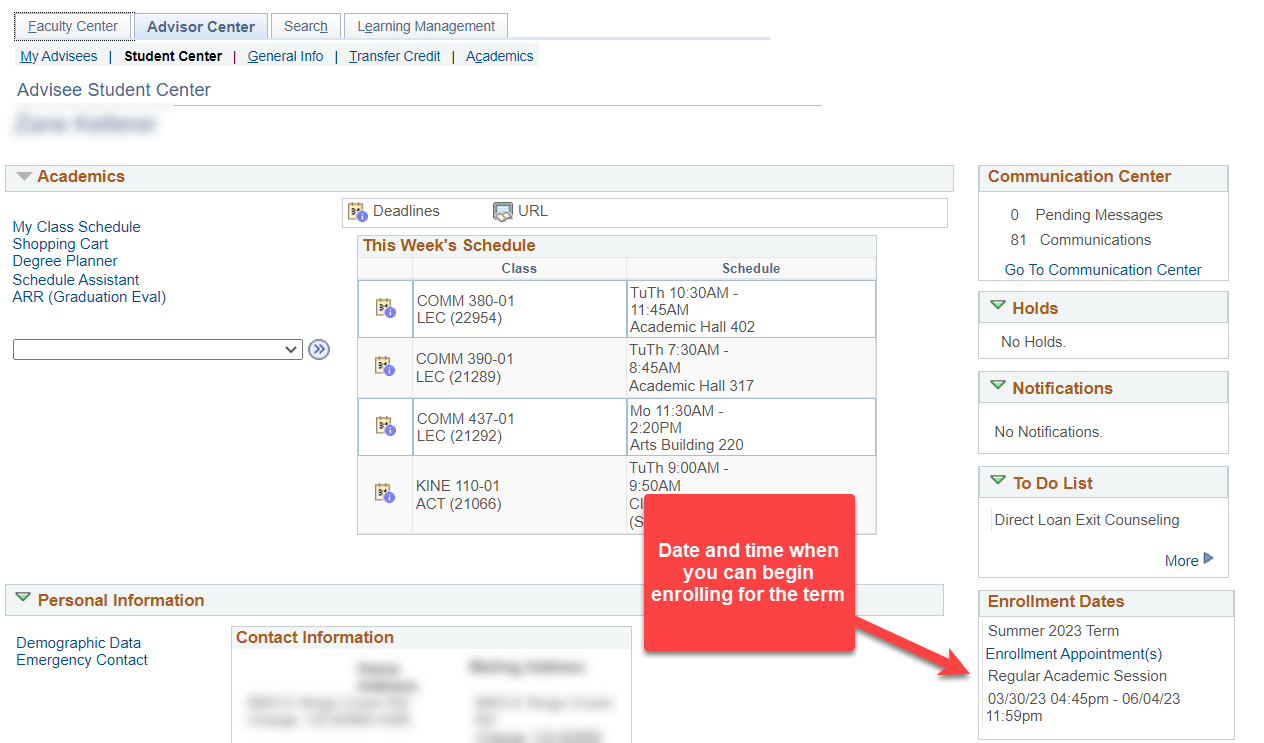
On your assigned enrollment date (which will be visible in MyCSUSM) you will be able to begin enrolling in classes (you can enroll through add/drop, but this is the first date you can begin enrolling).
When do I enroll?
You may enroll in courses beginning on your assigned enrollment date through the add/drop period, and view your current course schedule in MyCSUSM. The specific time you may begin enrolling will be assigned to you in mid-May and will be visible in your student center at that time. You are encouraged to begin enrolling on your enrollment date!
Transfer Students: June 9 - 10
Please keep in mind that you may view your enrollment planning tools before your transfer credit has been posted. You can find more information about the timing of when your transfer credit is evaluated and applied to your record on our Transfer Credit page.
First-Year Students: June 23 - 24
Success coaches will be available to help students with the enrollment process both in person and virtually Tuesday, June 23- Wednesday, July 1 (excluding Sat/Sun) 9am-4pm (closed for lunch 12pm-1pm). All drop-ins will be helped on a first come first served basis. Students should have reviewed the Enrollment Tutorial prior to utilizing drop-ins.
In person drop-ins will be held in on campus in the Technology Learning Center located on the 2nd floor of the Kellogg Library. We recommend parking in Lots B or C. Campus parking fees and policies apply.
Virtual drop-ins will be held via the Virtual Front Desk in MS Teams.
More details, visit the Office of Success Coaching website.